
Record with ffmpeg
TV4ever 3.x LEVER!
TV4ever supports more than 1.000 sites including
TV4ever can feed your ffmpeg powerful command lines.
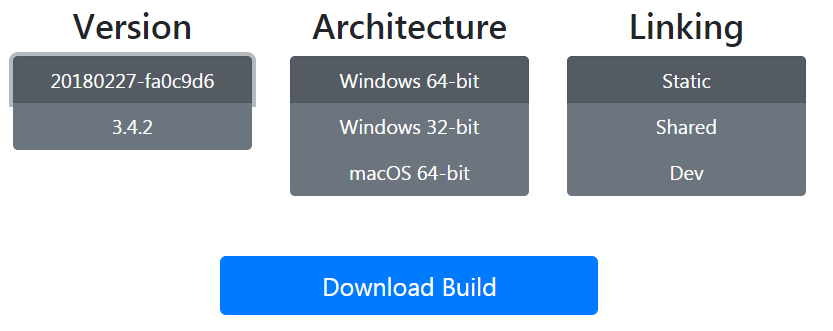
Download an ffmpeg, suitable for your platform (you might already have it installed or can do so pretty fast with a sudo apt-get install ffmpeg command)
Here we'll show how to install it on a Windows 64-bit platform (most Windows 7 and Windows 10).
You'll get a zip-fil..
Place the contents of the zuip file n a folder on your harddisk.
Here w'll put it in e:\ffmpeg
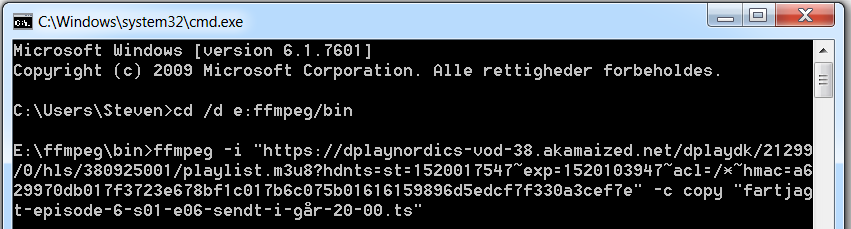
In Windows
- Press Start, og write cmd i Windows' search. Press ENTER. A box with a command prompt should show up.
- Write cd /d e:ffmpeg/bin, and press ENTER.
Now you're in the very place where your ffmpeg command lines will work perfectly.
TV4ever cannot record the sound on the Dplays series Fartjagt.
But ffmpeg has such an ability.
So: in TV4ever, press the command line icon and copy something like
ffmpeg -i "htps://dplaynordics-vod-38.akamaized.net/dplaydk/21299/0/hls/380925001/playlist.m3u8?hdnts=st=1520017170~exp=1520103570~acl=/*~hmac=92ec492ee1baf953ca8e89e7448349ad0cc991594d5a3080fd83e273bbfa886e" -c copy "fartjagt-episode-6-s01-e06-sendt-i-går-20-00.ts"
to your clipboard.
Paste that into the command line windows we just opened.
Press Enter and ffmpeg will record it flawlessly.
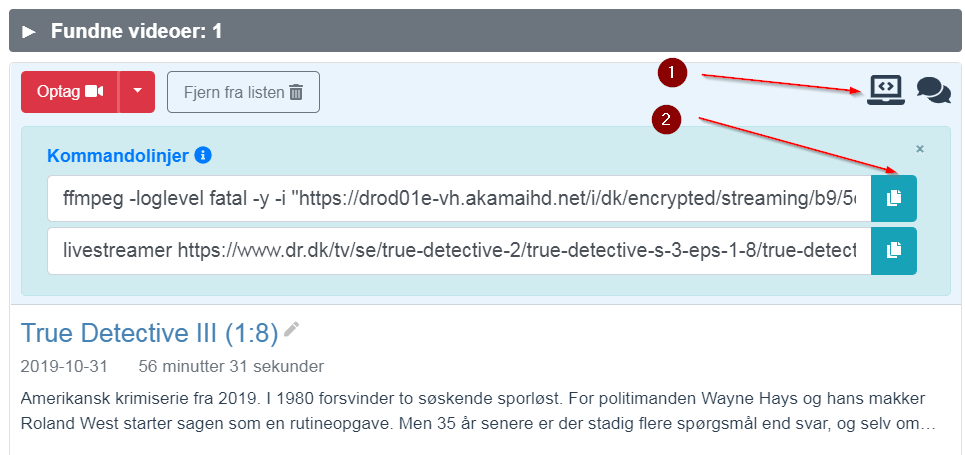
TV4ever can also assist with command lines for Livestreamer.